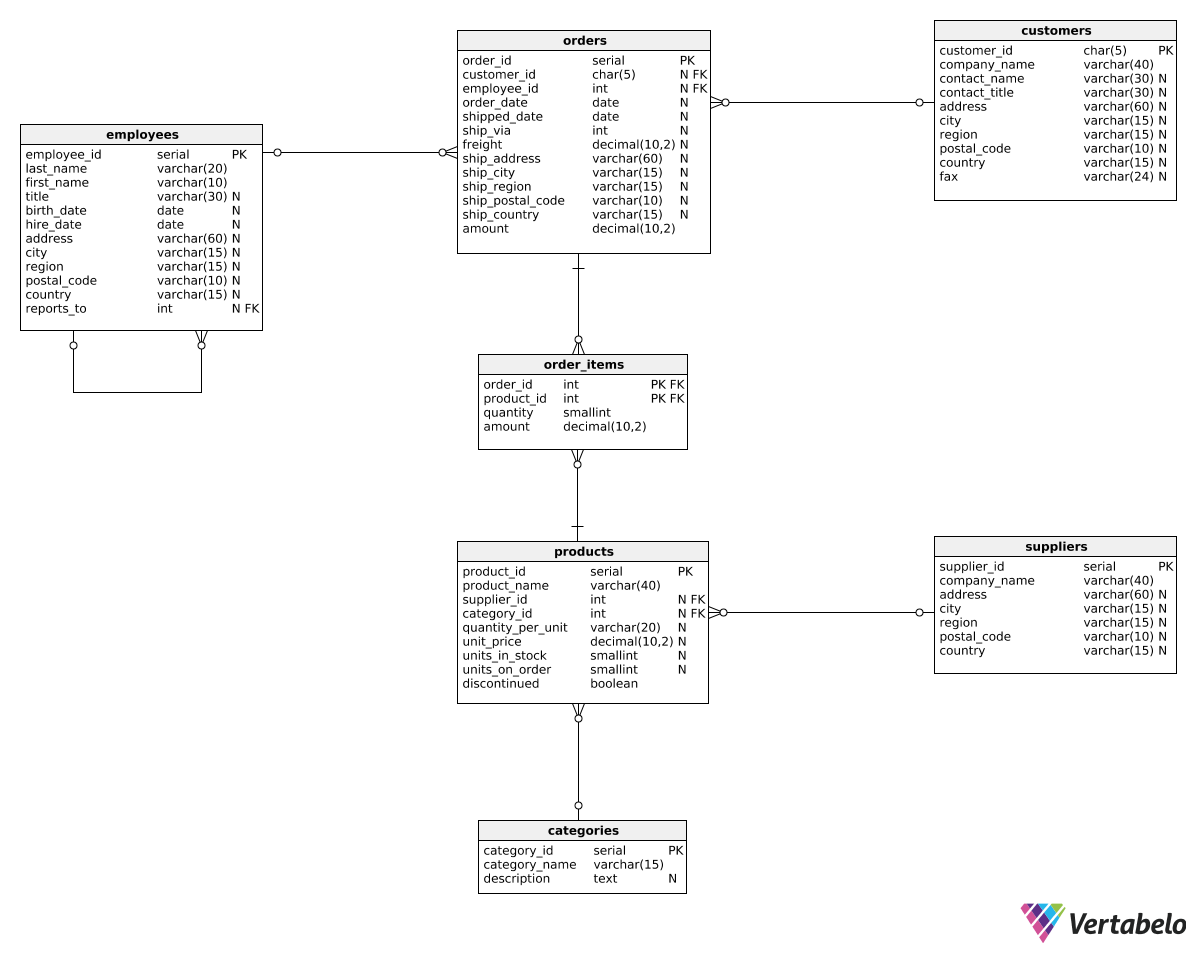
Instruction
Great work! We can also create another version of this report by changing revenue values into revenue deltas. The end result should look like this:
| revenue_year | total_revenue_delta | beverages_revenue_delta | seafood_revenue_delta |
|---|---|---|---|
| 2016 | null | null | null |
| 2017 | 409001.29 | 56005.32 | 47567.99 |
| 2018 | -176461.34 | 12100.56 | -22047.92 |
We can use the following query:
SELECT
  EXTRACT(year FROM order_date) AS revenue_year,
  SUM(oi.amount) - LAG(SUM(oi.amount)) OVER (ORDER BY EXTRACT(year FROM order_date)) AS total_revenue_delta,
  SUM(CASE WHEN c.category_name = 'Beverages' THEN oi.amount ELSE 0.0 END)
  - LAG(SUM(CASE WHEN c.category_name = 'Beverages' THEN oi.amount ELSE 0.0 END)) OVER (ORDER BY EXTRACT(year FROM order_date)) AS beverages_revenue_delta,
  SUM(CASE WHEN c.category_name = 'Seafood' THEN oi.amount ELSE 0.0 END)
  - LAG(SUM(CASE WHEN c.category_name = 'Seafood' THEN oi.amount ELSE 0.0 END)) OVER (ORDER BY EXTRACT(year FROM order_date)) AS seafood_revenue_delta
FROM order_items oi
JOIN orders o
  ON oi.order_id = o.order_id
JOIN products p
  ON p.product_id = oi.product_id
JOIN categories c
  ON c.category_id = p.category_id
GROUP BY EXTRACT(year FROM order_date)
ORDER BY EXTRACT(year FROM order_date);
We now calculate each column as the sum from the current year (SUM(oi.amount)) minus the sum from the previous year (LAG(SUM(oi.amount)) OVER (ORDER BY EXTRACT(year FROM order_date))). To that end, we used the LAG() OVER() pattern we learned in the previous part.
Exercise
Create a report similar to the one shown in the explanation. This time, however, show the revenue changes in the four quarters of 2017 for the 'Produce' and 'Confections' categories. Show the following columns: revenue_quarter, total_revenue_delta, produce_revenue_delta, and confections_revenue_delta.
Stuck? Here's a hint!
Use a WHERE clause to filter the orders from 2017. Then, use EXTRACT(quarter FROM order_date).