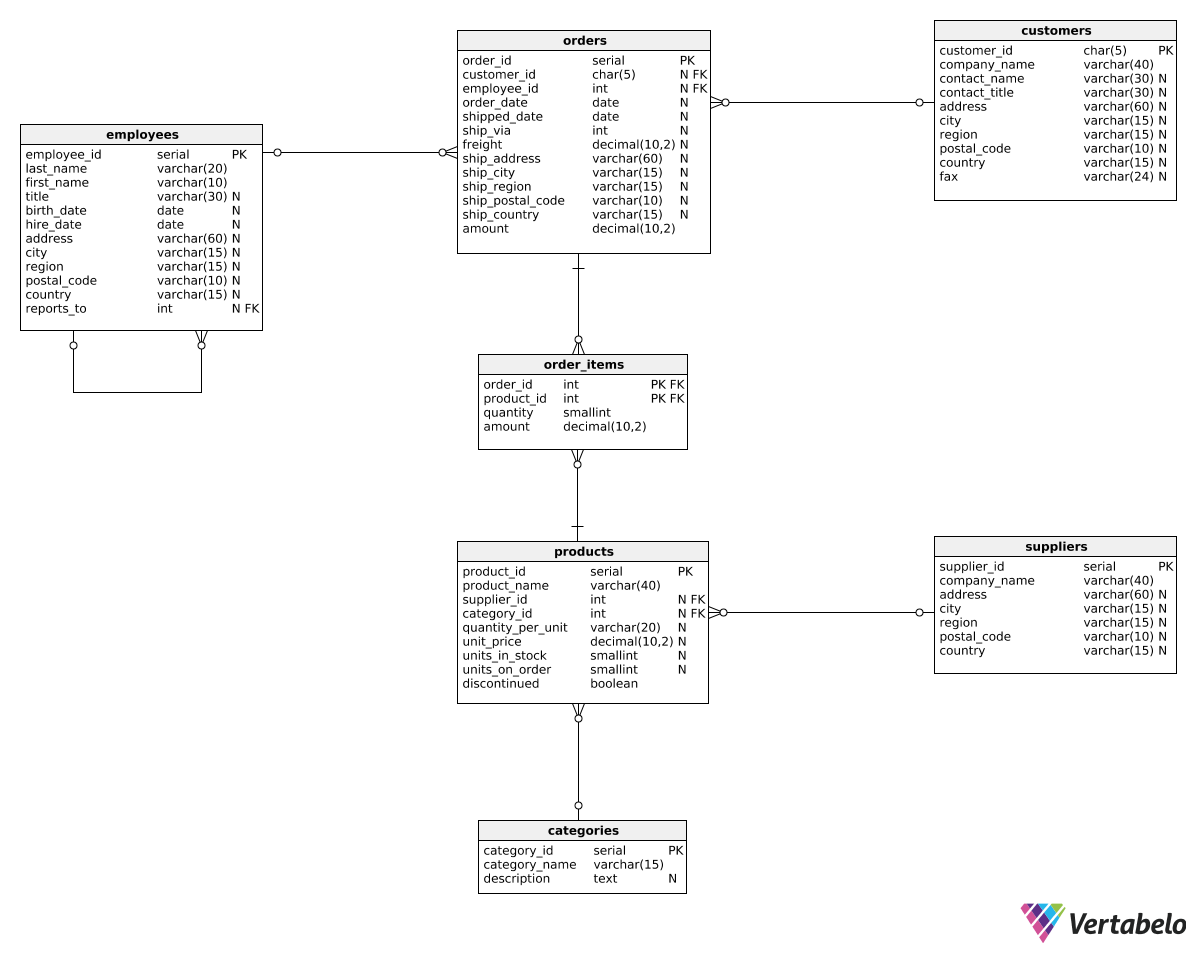
Introduction
Total revenue for multiple periods
Calculating deltas
Creating "revenue in quarters" reports
Instruction
Perfect! Now we'd like to show the quarterly revenue in each year. To do that, we could use the following query:
SELECT
  EXTRACT(year FROM order_date) AS revenue_year,
  EXTRACT(quarter FROM order_date) AS revenue_quarter,
  SUM(amount) AS total_revenue
FROM orders
GROUP BY EXTRACT(year FROM order_date),
  EXTRACT(quarter FROM order_date)
ORDER BY EXTRACT(year FROM order_date),
  EXTRACT(quarter FROM order_date);
We would get a result like this:
| revenue_year | revenue_quarter | total_revenue |
|---|---|---|
| ... | ... | ... |
| 2016 | 4 | 128355.40 |
| 2017 | 1 | 138288.95 |
| 2017 | 2 | 143177.03 |
| ... | ... | ... |
As you can see, we used EXTRACT() twice, with either year or quarter as the first argument. We also group all rows by both the year and quarter columns.
Exercise
Show the total monthly revenue in each year, but only for orders processed by the employee with ID of 5.
Order the results by year and month. The columns names should be revenue_year, revenue_month, and total_revenue.
Stuck? Here's a hint!
Use EXTRACT twice, once with year and once with month.