

Introduction
Foreign keys
Multi-column Foreign Keys
Instruction
Great! You can also show foreign keys in ERD diagrams. To do so, we use the abbreviation FK. For instance, the ERD for the table you've just created can appear as follows:
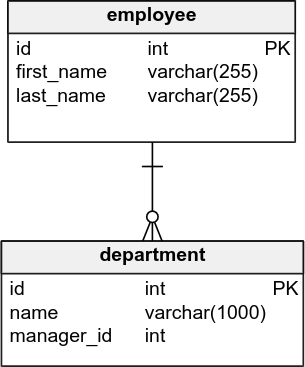
As you can see, manager_id is a foreign key in this table because it's marked with FK. There is a line between the department table and the employee table since there is a connection between them; the column manager_id in the department table points to the employee table.
Exercise
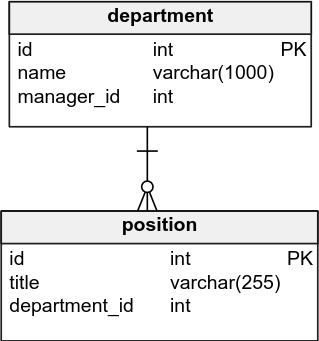
Our database is getting bigger. We now have another table position which will store information about various positions available in a given department. Use the ERD below to create the proper table.
Stuck? Here's a hint!
Type:
CREATE TABLE position (
  id integer PRIMARY KEY,
  title varchar(255) NOT NULL,
  department_id integer NOT NULL,
  FOREIGN KEY (department_id)
    REFERENCES department (id)
);
