Instruction
Good job! The queries we've written so far all returned a single value. Let's change that.
Suppose we want to find the average order value for each customer from Canada. How can we do that? Let's find out.
WITH order_total_prices AS (
  SELECT
    o.order_id,
    o.customer_id,
    SUM(unit_price * quantity) AS total_price
  FROM orders o
  JOIN order_items oi
    ON o.order_id = oi.order_id
  GROUP BY o.order_id, o.customer_id
)

SELECT
  c.customer_id,
  c.company_name,
  AVG(total_price) AS avg_total_price
FROM order_total_prices OTP
JOIN customers c
  ON OTP.customer_id = c.customer_id
WHERE c.country = 'Canada'
GROUP BY c.customer_id, c.company_name;
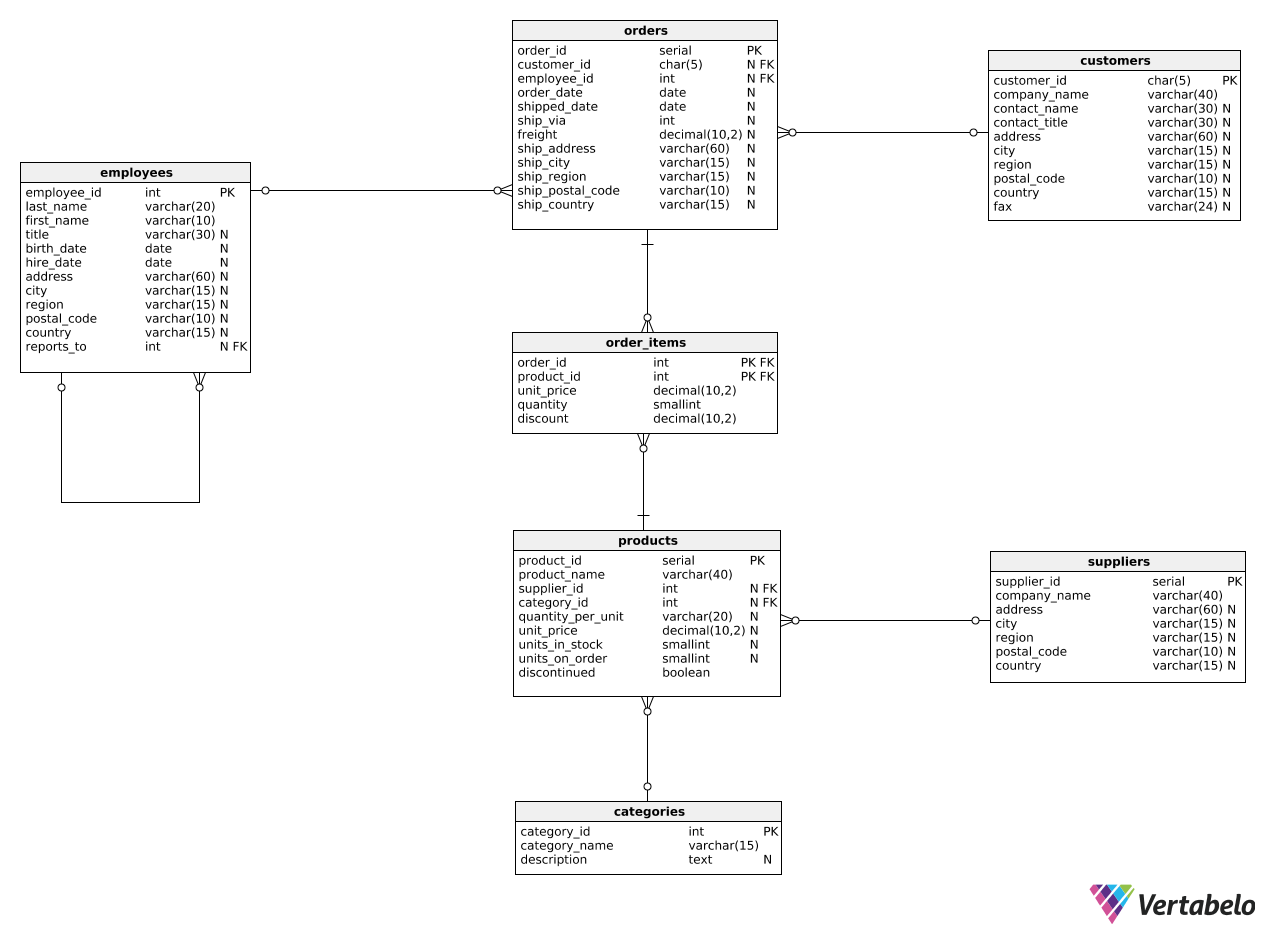
In the query above, we first write a CTE that calculates the total price (before discount) for each order. Note that we also put the customer_id column in the SELECT clause so that we can refer to it in the outer query.
In the outer query, we use the AVG() function as before, but this time, we also group all rows by customer_id. We also join the CTE with another table (customers) so that we can show company names and select only those customers who come from Canada.
Exercise
For each employee from the Washington (WA) region, show the average value for all orders they placed. Show the following columns: employee_id, first_name, last_name, and avg_total_price (calculated as the average total order price, before discount).
In the inner query, calculate the value of each order and select it alongside the ID of the employee who processed it. In the outer query, join the CTE with the employees table to show all the required information and filter the employees by region.
Stuck? Here's a hint!
You can use a template:
WITH order_total_prices AS (
  ...
)
SELECT ...
FROM order_total_prices OTP
JOIN ...
In the inner query, join orders and order_items tables. In the outer query, join order_total_prices and employees tables.